
Event hooks
An event hook runs one agent turn when something happens in Paddock. When
a lifecycle event fires — the event that fires a general-purpose hook today is
onArchive, raised when you archive a chat — Paddock starts an agent turn to
react to it. A hook is the
event-driven sibling of a schedule (which is time-driven); in Paddock both
are kinds of trigger.
The motivating example is housekeeping: “when I archive a chat, tidy up after it” — spin down a dev server, delete a scratch clone, jot a line in a log. You declare that once as a hook, and from then on it happens on its own.
A hook is an agent turn, and its tools are its capability
Section titled “A hook is an agent turn, and its tools are its capability”A hook is not a fixed built-in behaviour. It’s a small agent turn you describe, and the tools you grant it are its entire capability:
- Grant it no tools and it can only read its prompt and think — a hook that reasons and returns text.
- Grant it
Writeand it can author a file (anOVERVIEW.md, a log). - Grant it
Bashand it can run shell commands — stop apmserver,git, delete a clone — and it does that work itself.
There is no hook “kind”, “profile”, or “curator” concept to choose from: the
capability is the tool list. Under the hood the hook runs as its own agent
(trigger-<slug>-<name>) registered exactly like the project’s own agent, and
the tools you pick are what that agent is configured with. A hook’s capability
also includes its permission mode, an optional model override, and a max_turns
bound (default 30) so a runaway hook can’t loop forever.
It fires after the action, and can never break it
Section titled “It fires after the action, and can never break it”The event bus is in-process and fire-and-forget. A hook fires after
the triggering action has already committed, and its turn runs detached — Paddock
never waits on it and never surfaces its errors back onto the action. Archiving a
chat always succeeds and returns immediately, whether or not an onArchive hook
is declared, and whether that hook succeeds, fails, or is slow. A hook can
observe and react to an action; it can never block or fail it.
%% TB, not LR: this chain is 1293px wide laid out horizontally and gets scaled
%% ~2x down into the prose column. Stacked it is 276px, so it renders 1:1.
flowchart TB
  A["You archive a chat"] --> B["Archive commits<br/>(response returns)"]
  B --> C{{"onArchive event"}}
  C -. "fire-and-forget" .-> D["Hook agent turn<br/>trigger-slug-name"]
  D --> E["A new hook chat<br/>⚡ badge + capability banner"]
Because the hook fires only after a real state change, it won’t run on a no-op (re-archiving an already-archived chat raises nothing).
New hooks are disabled until you arm them
Section titled “New hooks are disabled until you arm them”Every hook has an enabled flag, and a newly-created hook defaults to
disabled — writing a hook never makes it fire the same instant. You enable it
when you’re ready, and disabling it later stops it firing without deleting its
definition (its past runs stay readable).
A hook run is a chat you can read — and continue
Section titled “A hook run is a chat you can read — and continue”When a hook fires it appears as its own chat in the project’s sidebar, marked
with a small ⚡ lightning badge so the “ran without me” runs stand out from the
chats you started yourself. Open one and a read-only capability banner floats
at the top, stating what fired it (the event), the exact tools it was granted,
its permission mode, model, and max_turns, and the agent enforcing them:
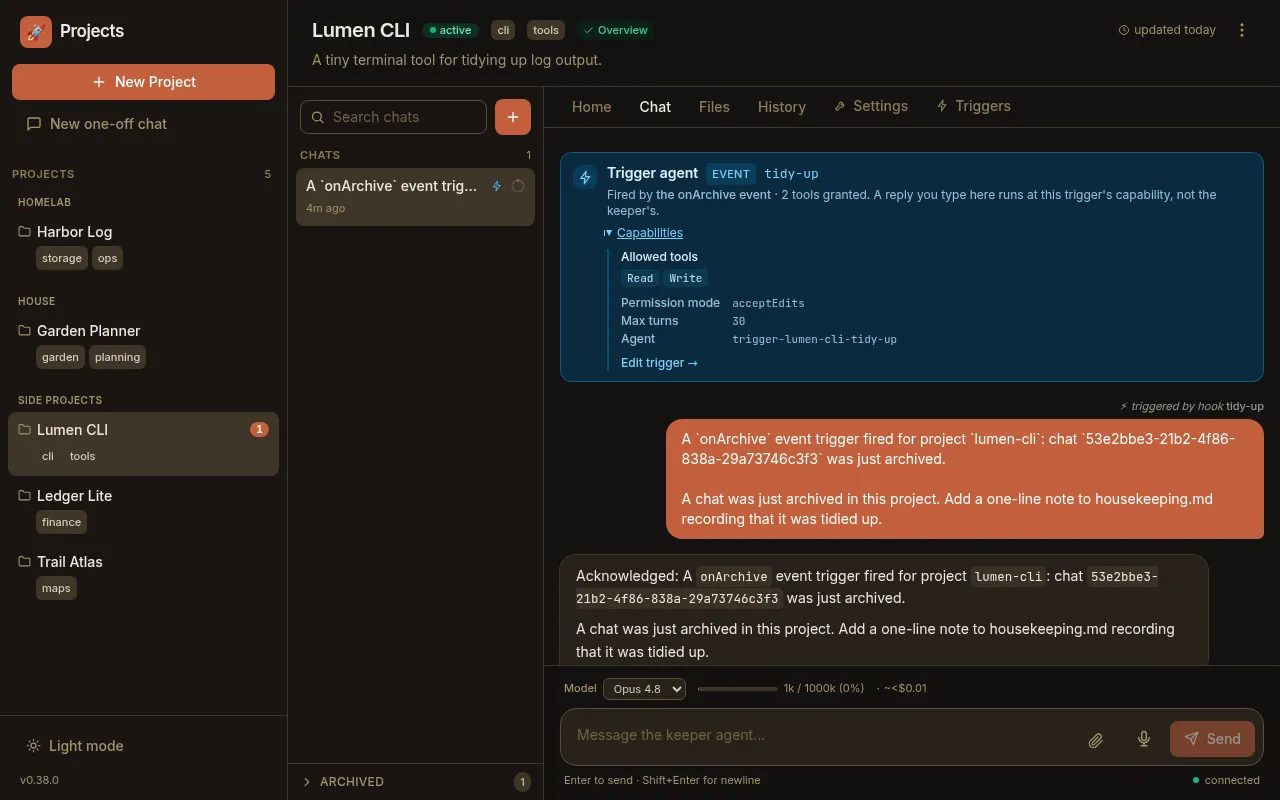
The banner is projected from the same registered agent config the runtime enforces, so it can’t claim a capability the hook doesn’t actually have — it’s truthful by construction. If you type a reply in a hook chat, your turn runs at the hook’s capability, not the project’s full toolset — the banner is there so that’s never a surprise.
The events a hook can fire on
Section titled “The events a hook can fire on”The event picker lists two lifecycle events, but only one defines a general-purpose hook:
| Event | Fires when | Payload |
|---|---|---|
onArchive | A chat is archived (from the sidebar action or the self-MCP archive_chat tool) | The archived chat’s session id |
onArchive is the first of a family of cheap after-the-fact events, and the
event list is the extension point for more. The picker’s other option,
afterTurn (a user turn completed), is a special case: choosing it defines or
customizes the post-turn curator — the sweeper — rather
than a general hook agent. So for a hook that reacts to something you did,
onArchive is the event to use.
Where a hook lives
Section titled “Where a hook lives”A hook is configuration, stored per project so it’s versioned with everything else:
- Its definition — the event, the granted tools, the enabled flag — lives in the
project’s
project.yaml. - Its prompt can be inline, or kept in a git-tracked, agent-editable
.mdfile under.paddock/triggers/and read fresh each time the hook fires.
You rarely edit that by hand — the Triggers tab
writes it for you, and the hook-management MCP tools let
Claude manage its own hooks — those tools are the thing PADDOCK_HOOKS_MCP
gates, and they are off by default.
Next steps
Section titled “Next steps”- Automating with hooks — the hands-on
walkthrough: create an
onArchivehook, grant it a capability, enable it, and read the run it produces. - The sweeper — the post-turn curator that rides the
afterTurnevent. - Hooks reference — the
project.yamlschema and the hook-management MCP tools.