
What your agents can do
Securing Paddock answers one question: who can start a turn. This page answers the other one: what a turn can do once it has started.
A correctly-authenticated user, a scheduled trigger firing at 3am, and an attacker who got past your proxy all reach the same agent, with the same tools and the same credentials.
The default toolset
Section titled “The default toolset”Every project agent is registered with a hard-coded tool list. Paddock generates
herdctl.yaml at boot with a header reading “GENERATED by paddock-server. Do NOT
hand-edit”, and rewrites it on every start:
Read Edit Write Bash Glob Grep WebFetch WebSearch TaskTodoWrite Skill NotebookEdit ToolSearch ScheduleWakeup MonitorCronCreate CronList CronDelete mcp__playwright__*The denylist is not a sandbox
Section titled “The denylist is not a sandbox”The generated config also carries a denied_tools list — 23 Bash patterns covering
sudo, chmod 777, and bare-root wipes like rm -rf / and rm -rf ~. It is worth
having. It is not a security boundary, and Paddock’s own source says so:
a best-effort, defence-in-depth denylist, NOT a sandbox … these string patterns are trivially bypassable (a relative path, a
$VAR, afind -delete) and are here only to make the obvious catastrophic footguns require deliberate rephrasing.
The gaps are deliberate and documented: rm -rf /usr/local/… is not caught, because the
pattern that would catch it also blocks the legitimate absolute-path cleanup agents do
all day. Narrow and honest beat broad and leaky. Real isolation is
#7, open.
Reach: where an agent can go
Section titled “Reach: where an agent can go”An agent’s working directory is where it starts, not where it is confined. Bash and
Write are on the allowlist and nothing constrains the paths they touch. There is no
chroot, no seccomp profile, and no per-agent uid.
- A project is not a boundary.
cd ../other-projectworks, as does reading that project’s.chats/transcripts, itsproject.yaml, and thepaddock.config.yamlabove them all. If two projects need genuinely different trust levels, that needs to be two Paddock instances with separate data directories and credentials — not two projects. - The root workspace agent’s working directory is
projectsRoot— the parent of every project. Onegrep -rreads every chat on the instance. See Workspaces. - An agent can edit
paddock.config.yaml, where every instance capability flag lives. send_filetakes an absolute path. The attachment tool is injected into every keeper turn behind no flag, and a relative path resolves against the project directory while an absolute one is used as-is — “Because we copy rather than reference, there’s no sandbox.” Not an escalation for an agent that already hasBash, but it means on-box file contents reach the chat UI, and it applies to scoped trigger agents that have no other tools. See Sending files & images.
Every turn carries an operator-editable prompt block
Section titled “Every turn carries an operator-editable prompt block”Paddock appends an environment prompt to each keeper turn’s system prompt. It is
short, and one of the two things it says is use mcp__paddock__send_file to show the
user an image or a rendering rather than describing it — so the send_file behaviour
above is partly instructed, not purely emergent. The default text also tells the agent
its replies render as Markdown in a browser and to make links clickable.
You can change or remove it. Resolution is by definedness, not emptiness, because blank is the opt-out:
PADDOCK_ENVIRONMENT_PROMPTdefined at all — including empty — wins outright, and the Settings screen renders the field read-only while it is set.- Otherwise a string
environmentPrompt:inpaddock.config.yamlwins, empty included. A non-string value (a YAML number, a mapping, or thenullyou get from a bareenvironmentPrompt:with nothing after it) is ignored and falls back to the default — so a typo’d key quietly gives you the built-in text rather than an error. - Otherwise the built-in default.
The Settings → Capabilities → Environment prompt editor is the same value.
Paddock’s own credentials are reachable
Section titled “Paddock’s own credentials are reachable”Paddock does not construct a filtered environment for agent subprocesses — they inherit
the server process’s environment as-is. There is no allow-list and no redaction. An agent
with Bash can read, out of /proc/self/environ:
CLAUDE_CODE_OAUTH_TOKEN/ANTHROPIC_API_KEY— your Anthropic credential- every env var a
managementApi.clients[*].auth.refpoints at (conventionallyPADDOCK_MCP_TOKEN_*) — including write-scoped Management API tokens - whatever else your deployment exports into the server’s environment
Also on disk: if the instance is logged in with a Claude subscription,
<claudeHome>/.credentials.json (<dataDir>/claude-home/, usually a symlink to
the user’s ~/.claude/.credentials.json) holds the OAuth refresh
token, not just a short-lived access token. If you ever have to assume it leaked, rotating
locally is not enough — revoke at Anthropic.
There is currently no control for this, so plan around it: give the instance the narrowest credentials that let it do its job, and don’t co-locate secrets belonging to other systems in the same environment.
Persistence: an agent can schedule its own future
Section titled “Persistence: an agent can schedule its own future”ScheduleWakeup, CronCreate, CronList and CronDelete are on the default toolset,
gated by no capability flag. A turn can register a durable wake that resumes its own
session with a prompt of its choosing, persisted under the herdctl state directory
(<PADDOCK_DATA_DIR>/.herdctl/ by default, or PADDOCK_STATE_DIR) and surviving a
restart.
Unlike a trigger — which lives in project.yaml or
.paddock/triggers/, shows up in the Triggers tab, and is visible in a diff — an
agent-created wake has no operator-facing surface. If you want to know what your
instance has scheduled for itself, you have to read herdctl’s state file directly.
What you can narrow
Section titled “What you can narrow”Permission mode
Section titled “Permission mode”The one capability dial that is per-project. Set it in project.yaml or the project’s
Settings tab.
| Mode | Behaviour |
|---|---|
default | Claude asks before consequential tool calls |
acceptEdits | Paddock’s default. File edits proceed unprompted; other prompts stand |
plan | Read-only planning; no mutations |
bypassPermissions | Every tool runs unprompted, with no gate at all |
There is no instance-level default — every project independently starts at acceptEdits,
including projects an agent creates via create_project.
Scoped agents: triggers and hooks
Section titled “Scoped agents: triggers and hooks”A trigger or hook runs as its own agent whose run.tools list becomes that agent’s
allowed_tools, so its capability is set by configuration rather than by instruction.
This is the closest thing Paddock has to a per-agent allow-list.
triggers: nightly-notes: trigger: { type: schedule, cron: "0 3 * * *" } run: tools: [Read, Glob, Grep] # the capability IS this list maxTurns: 30 permissionMode: defaultGrant the narrowest set that does the job. Bash is described in Paddock’s own tool
picker as “the broadest grant” — granting it to an unattended trigger means arbitrary
shell on a schedule. Full schema in the hooks reference.
The picker says so at the point of decision: ticking Bash highlights the row and
raises a warning underneath the list, so the grant is never silent.
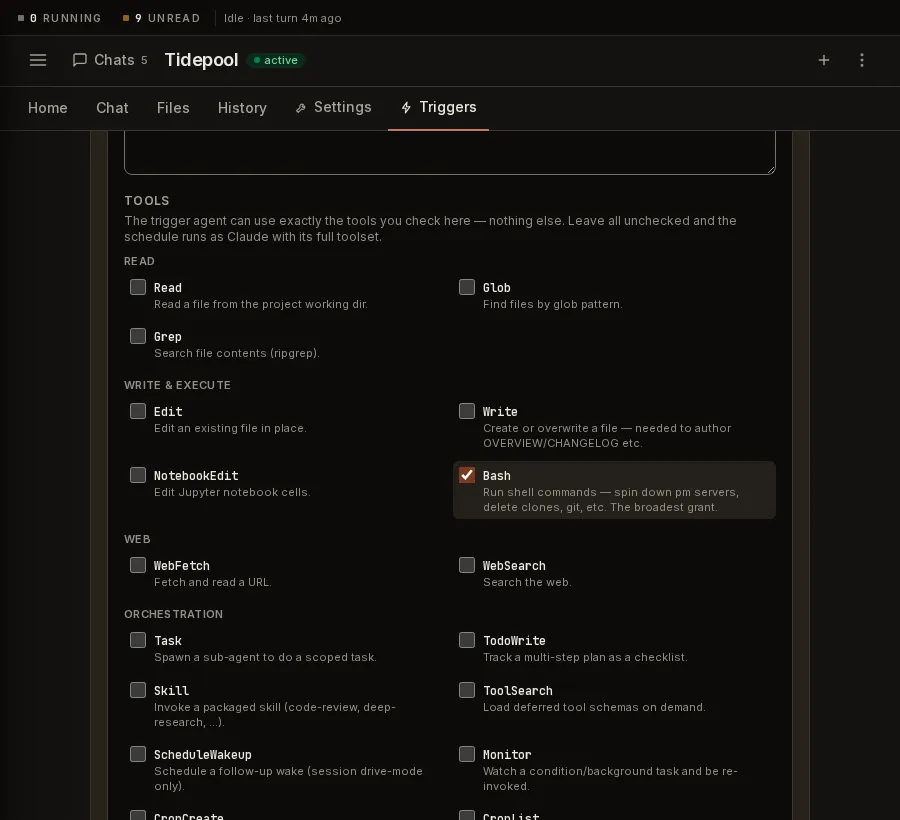
Limits that do hold: new triggers and hooks are disabled until you arm them, they
default to maxTurns: 30, and a trigger’s prompt file must live under
.paddock/triggers/ and end in .md.
The sweeper
Section titled “The sweeper”The post-turn sweeper is the narrowest agent Paddock runs: no
injected MCP tools, max_turns: 4, a cheap model, a working directory outside
projectsRoot, and a system prompt whose first instruction is “You DO NOT use any
tools — you only return text.” It decides what to write; Paddock does the writing, so a
sweep can never mutate your code or trigger another sweep.
It is a good model for scoping unattended work. Note, per the trap above, that its tool-lessness rests on its prompt, its runtime and its lack of injected tools rather than on an enforced allow-list.
Docker isolation
Section titled “Docker isolation”Per-project, project.yaml → docker: true (or the Settings toggle) asks Paddock to run
that project’s agent in a container. It defaults to false.
Where it does apply, a container gives you filesystem and capability isolation — only
that project’s directory is mounted, and herdctl drops all capabilities and sets
no-new-privileges. What it does not give you is network isolation (the container
gets a normal bridge network with full outbound access) or protection for your Anthropic
credential, which has to go in for the agent to work at all.
Instance capability flags
Section titled “Instance capability flags”These gate the self-management MCP — the tools with which an
agent manages Paddock itself. The five booleans all default off; maxSpawnDepth is a
number.
| Flag | Env var | Grants |
|---|---|---|
selfMcpEnabled | PADDOCK_SELF_MCP | Read: list projects/chats, read a chat |
selfMcpWriteEnabled | PADDOCK_SELF_MCP_WRITE | Starts real turns: create_chat, send_message, fork_chat |
selfMcpProjectsEnabled | PADDOCK_SELF_MCP_PROJECTS | create_project / promote_project — git clone on a URL the agent chose |
hooksMcpEnabled | PADDOCK_HOOKS_MCP | list_triggers / set_trigger / remove_trigger / run_trigger |
browserMcp | PADDOCK_BROWSER_MCP | Headless Chromium (accepts literal 1 only) |
maxSpawnDepth | PADDOCK_MAX_SPAWN_DEPTH | Default 1. How deep spawned turns keep these tools |
Full semantics — the nesting (projects ⊂ write ⊂ read, with the trigger tools also
requiring write; browserMcp stands alone), and why these do not gate an external
/mcp client — are in the
self-management MCP reference. Three things matter from the
capability side:
- The hooks gate is binary. An agent with the hooks MCP can create a hook at any
capability, including
BashwithbypassPermissions. Note this is not the only route to self-scheduling —CronCreateis on the default toolset already. maxSpawnDepth: 1means depth-1 turns — the direct children of a human- or trigger-initiated chat — keep the self-MCP write tools; their children do not. It is an anti-fork-bomb measure, not an authority boundary.- These are settable over
PUT /api/instance-config. See below.
Inherited from the host machine (claude:)
Section titled “Inherited from the host machine (claude:)”Separate from the flags above, three of the claude:
levers decide whether the machine Paddock runs on
contributes capability to a turn. All three default to own, meaning it does not.
| Key | At host, a turn also gets |
|---|---|
claude.hooks | The shell commands your ~/.claude/settings.json binds to tool use and session lifecycle |
claude.instructions | Your ~/.claude CLAUDE.md (standing instruction), plus agents/ and commands/ — definitions the model can invoke by name |
claude.mcpServers | The MCP servers in your ~/.claude.json, with the allow-list widened to match |
hooks is the one that is unambiguously code execution, and it is worth knowing
it used to be unconditional: before v0.62 the host’s hooks ran inside every
Paddock turn with no key to turn them off. That default is now own.
Two qualifications, both easy to state too strongly:
hooks: ownstops hooks, not every host command. Othersettings.jsonkeys name a script to run —apiKeyHelper,awsCredentialExport,awsAuthRefresh,gcpAuthRefresh,proxyAuthHelper,otelHeadersHelper,statusLine,subagentStatusLine— and those are still inherited (#698).- The reach is narrower than it sounds, today. Paddock’s chat runtime loads
only the project setting source, so the Claude home’s
settings.json,CLAUDE.md,agents/andcommands/are not read on a default SDK chat turn at all. They apply on the CLI paths — the post-turn sweeper, and any turn resolved todriveMode: batch. (A trigger is a CLI path only when its project or the instance is pinned tobatch; on the defaultsessionit is an SDK turn like any other.) That is a herdctl default rather than a guarantee, so it is the wrong thing to rely on as a boundary; treathooks: ownas the control and this as a footnote.
Note a repo-supplied .claude/settings.json in a project’s working directory is
a different and unrelated route to the same outcome, and is not governed by any
of these keys — see Prompt injection.
What Paddock does not limit
Section titled “What Paddock does not limit”- No spend cap, budget, or turn-rate limit. Cost is estimated for display, never enforced. Set limits at your Anthropic account.
- No egress control.
WebFetch,curlviaBash, DNS,git pushto any repo the token allows, andsend_fileinto the chat UI all work unrestricted — inside a container too. If this matters, it belongs in a firewall rule on the host. - No rate limiting on the HTTP API or the WebSocket. Each project caps concurrent turns at 10, but nothing bounds the rate at which they start.
- No role model. Every authenticated user is fully privileged, and there is
no per-resource authorization — “authenticated” does not mean “owns
this chat”.
PUT /api/instance-configcan rewrite every flag in the table above, and in the defaultauth.mode: noneit is reachable by anyone who can reach the port. - Model allow-lists are not a capability control — they filter the picker, not the turn. See Model allow-lists.
How you would know
Section titled “How you would know”Paddock has no audit log. Detection is assembled from surfaces built for other purposes, so it’s worth knowing which ones answer a security question.
Regularly, and quickly:
- Diff
CLAUDE.md,project.yamland.paddock/. These are standing instructions and standing capability. If your projects root is a git repo, an unexplained edit to Curated notes, a new trigger, or a changedpermissionModeshows up as a diff — treat one like an unexplained change to a CI config. Nothing commits for you, so this only works if you (or a scheduled job) actually commit. - Your Anthropic usage graph. Paddock enforces no budget, so a step change in spend with no matching human chats is the loudest signal available — and the only one that fires when an agent has been quiet in the UI.
- The chat list’s scheduled and spawned badges, and run History, for turns nobody asked for.
- herdctl’s state file in the state directory, for wakes an agent scheduled for itself. Nothing in the UI shows these.
After anything surprising: git log --all on every repo the instance’s token can
reach (including branches nobody opened a PR from), paddock.config.yaml for flipped
flags, and the Triggers tab for hooks you don’t recognise — before restarting, since
a persisted wake fires on boot.
What you will not see: no record of what an agent read, no outbound-request log, no per-tool-call log outside the transcript, and no alerting of any kind.
Checklist
Section titled “Checklist”- The instance’s Anthropic and GitHub credentials are scoped to the minimum — a fine-grained PAT for just the repos this instance should touch, and an API key used by nothing else so you can revoke it without collateral.
- No unrelated system’s secrets are exported into the Paddock server’s environment.
- Paddock runs as a dedicated unprivileged OS user, not root and not your login — it has no per-agent uid, so the Unix user is the real boundary.
-
paddock.config.yamlis not writable by that user, if you rely on env vars to keep capability flags off — note this also disables the Config screen’s writes. - Branch protection on
mainfor every repo the instance can push to. -
permissionModereviewed per project;bypassPermissionsonly where you’d accept losing the working directory. - Unattended work runs on scoped agents with the narrowest
run.tools— and no schedule relies ontools: []to be safe. - Self-MCP write / projects / hooks flags are on only if you meant them, set via env vars if you don’t want them rewritable over the API.
- Spend limits set at your Anthropic account.
- The data directory is backed up, and you have run a restore.
- You have read Prompt injection and untrusted content — the capabilities above are what an injected instruction gets to use.