
What's New
0.72 — One key for the whole posture
Section titled “0.72 — One key for the whole posture”-
profile: paranoid | balanced | yolosets an instance’s security posture in one line, instead of a dozenPADDOCK_*variables. It supplies the defaults for the Claude sharing modes, spawn depth and the capability toggles, and nothing else — it cannot change your port, bind address or auth. The default isbalanced: on upgrade, an instance with no config file starts inheriting the host’sinstructionsandmcpServers, andprofile: paranoidrestores the old behaviour exactly.paddock config show --resolvedis the answer to “so what am I actually running?” — every effective value, and the layer it came from:Profile balanced (built-in default)CapabilitiesdriveMode session defaultselfMcpEnabled true profile (balanced)selfMcpWriteEnabled false profile (balanced)maxSpawnDepth 1 profile (balanced)…Advanced (read-only)claude.transcripts own profile (balanced)claude.credentials host profile (balanced)claude.instructions host profile (balanced)claude.hooks own profile (balanced)claude.mcpServers host profile (balanced)Every lever, key by key, is on Config profiles.
paddock config ejectwrites the whole resolution intopaddock.config.yamlfor anyone who would rather pin it in git than inherit it; it previews by default and applies with--write. -
Your chats can move into
~/.claude, soclaude --resumein a terminal can see them. Paddock keeps a project’s chats in its own.chats/by default, which is right for trying it and wrong for keeping it. The fleet readout offers the move when there is something to move, and nothing is deleted: a chat you leave unticked is set aside in.chats-pre-migration/beside its project.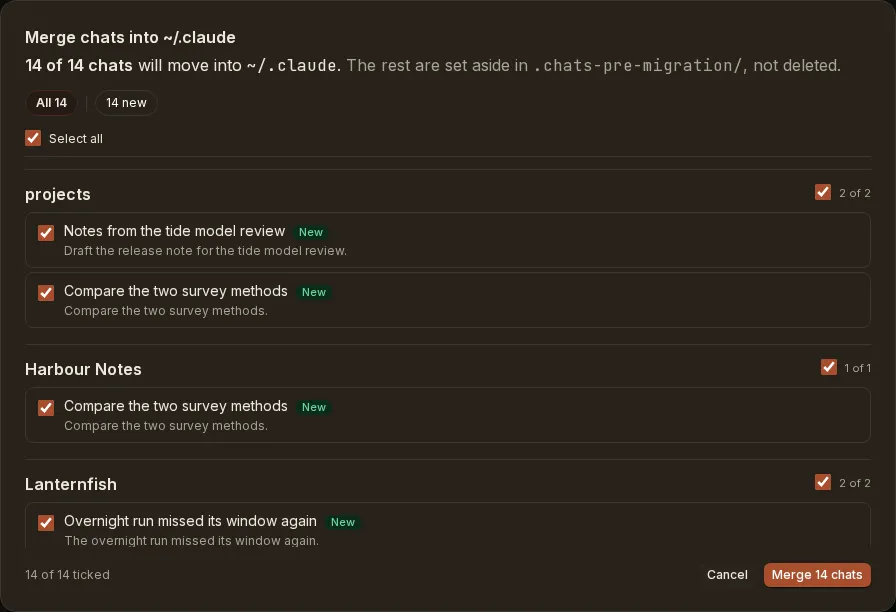
-
Fixed: flipping
claude.transcriptsfromhostback toownleft the instance writing into your real~/.claude.hostplants a symlink at<project>/.chatspointing out at your Claude home and nothing ever removed it, soownstopped isolating and deleting a chat unlinked a transcript Paddock had never owned. The stale link is now unplanted on every boot, and the delete refuses to run while a store is still a planted symlink. -
Forking from a message asks for a name first, like the sidebar’s fork button already did, rather than firing on click and titling the result
Fork of <chat>. The message you picked is still the branch point. (Versioned as 0.71.3, which was never released; it reached users in 0.72.)
0.71.2 — Service control
Section titled “0.71.2 — Service control”-
An installed Paddock service survives a graceful stop. Both unit files relaunched Paddock only on a non-zero exit, while the server handles
SIGTERMby exiting0— so sleep, logout or a straykillall read as an intended stop and Paddock stayed down until the next login. A crash was the survivable case. Upgrading does not rewrite a unit file, sopaddock service statusnow says when yours has the old shape and names the fix. -
paddock service start | stop | restart. Bouncing an installed service previously meant uninstalling it or dropping to the raw supervisor.startandrestartwait for the URL to answer before reporting success, so it can no longer claim to be running over a service that is crash-looping on a port clash. -
Home dropped its Files section.
0.71.1 — The front door
Section titled “0.71.1 — The front door”-
The root workspace’s Home is the instance’s onboarding surface. A brand-new install used to dead-end on its own front door:
/rendered Discovery instead of the workspace whenever the instance was empty, and on a machine with no Claude Code history both of Discovery’s exits were gated on something that could never happen — a front door with no button anywhere on it./is now always the root workspace, carrying Discovery inline while the instance is empty. Two cards sit on it permanently, each showing one entry at a time: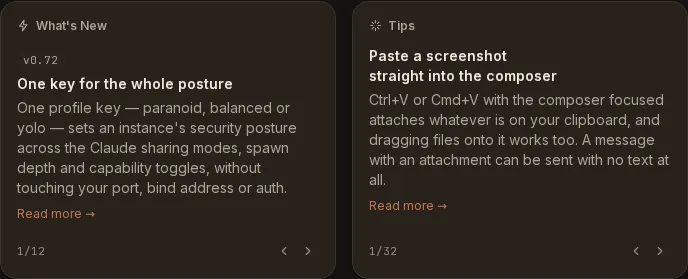
-
A chat’s “updated X ago” comes from its last message, not the file’s mtime. Paddock touches transcripts for reasons that are not conversation — discovery re-stats, attribution, a resume appending a mode record — so idle chats were restamped as “updated a few minutes ago” and floated to the top of the list in batches, phase-locked to a periodic task.
-
paddock service installnames each stage as it starts it, rather than sitting silent for several seconds and then dumping the whole success block.
0.71.0 — Stop one thing, not everything
Section titled “0.71.0 — Stop one thing, not everything”-
You can stop a single piece of background work. Each row in the running-work bar gets a ✕, and a Stop all appears once more than one thing is running — so a session with fifteen stray shells no longer has to be reaped whole. A shell stops in one click; a sub-agent asks first, because the kill cascades to everything that sub-agent started. A stop the runtime refuses says
can't stopand stays retryable rather than hanging atstopping….Each shell now shows the command it is running beside the description it was launched with, which is the difference between three plausible-looking waits and three copies of one loop polling a file that does not exist:

-
Deep-link to a single message. The per-message hover rail’s time/context pill is a real anchor: click it to copy the URL, and opening that URL loads the chat scrolled to the message. A link whose target has been reverted away says so instead of doing nothing.
-
A measured zero draws as an empty gauge. The fleet readout lit one of six segments for a chat measuring 0% context while its own tooltip read “Context 0% full”. A barely-started chat still lights one segment, so it cannot be mistaken for one that was never measured.
0.70.1 — Linked directories, all the way through
Section titled “0.70.1 — Linked directories, all the way through”-
The Changes tab, the file browser and Push act on the project’s own directory. For a project whose working directory isn’t its metadata directory — a linked worktree, a linked checkout, a repo-backed clone — three surfaces had been left behind, each failing silently: an untracked file rendered “File not found”, the Push button pushed the backing store rather than the project’s own repository, and a managed project with a
path:had an empty Files tab. -
The running-work bar collapses above four rows. A real session hit fifteen rows, taller than the composer the bar docks above, pushing the conversation off screen at the moment you most want to read it. It now opens as one line naming the mix and the age of the oldest task:

-
The Triggers tab stopped re-parsing the whole jobs directory every ten seconds. Measured against 2,016 job records, a warm call went from ~1,050 ms to ~75 ms.
0.70 — Inline code you can see
Section titled “0.70 — Inline code you can see”Mostly documentation and capture-rig work. Three things a user sees:
-
Inline
codehas its background back, and blockquotes their colour. The code chip borrowed a surface token, and when 0.68’s colour restoration raised the prose card underneath it the gap between the two closed to 1.04:1 — invisible. Both roles have tokens of their own now.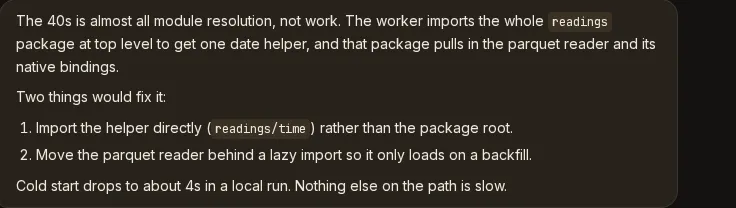
-
recovery.limboTimeoutMsis gone — parsed, defaulted, editable in Settings, and read by nothing since the day it was introduced. AlimboTimeoutMs:left in a config file is ignored exactly as it was before, andPADDOCK_RECOVERY_LIMBO_MScan be dropped from your environment. -
The root workspace’s Settings tab shows
(root)instead of a blank slug, andPADDOCK_SELF_MCP_PROJECTSnow says that as well as creating projects it gatespromote_project, whichgit clones a URL the agent supplies.
0.69 — Background work you can see
Section titled “0.69 — Background work you can see”-
Anything still running is pinned above the composer, not just sub-agents. A background
Bash, aMonitoror a workflow could run for minutes behind a card scrolled far up the transcript, and the only hint was a staticrunningchip — which meant “no completion notification was found in the transcript”, not “we checked”. A killed task kept that chip forever. The bar now names each running thing, what it is doing right now, how long it has been going and how many steps it has taken, and it clears when the work actually ends. It renders nothing when nothing is running.Two limits are worth knowing. The signal is per-process, so after a server restart the bar is empty until something new starts — which is right rather than a gap, because Paddock stops the fleet without waiting for jobs and those tasks really are dead, unlike the old chip that went on claiming a killed one was alive. And it is
driveMode: sessiononly: the CLI runtime reads the transcript file, and these are stream-only control messages that never reach it. -
A chat that is still working no longer reports itself idle. This is the fix proper. Background work outlives the turn that launched it, so the moment the reply landed the sidebar’s streaming dot, Home’s in-flight badge, the running-only filter and the fleet strip were all told the session had stopped while minutes of work carried on. They now read the truth. The composer is deliberately not locked while only background work runs — an hour-long
Monitorshould not make the chat unusable — so “this chat is busy” and “a model turn is in flight” are now two different questions with two different answers.Still open: sending into a chat that has live background work is not solved yet (#806). The composer is unlocked, but a message sent while a background task is still running can sit waiting on the runtime’s collision guard for up to five minutes before the new turn starts, and Stop still means end the session, which kills the work you were watching rather than interrupting the turn.
-
Fixed from 0.68: an imported directory appears in the sidebar straight away. Discover’s success screen said “they are in the sidebar now” while the sidebar still said “No projects yet” until you reloaded the browser. The list refreshes the moment the run finishes, and the results screen — including the rows that failed and have something to say about it — now stays up until you leave it rather than being unmounted by its own refresh. (Shipped to npm as 0.68.1, which has no git tag or release page of its own.)
0.68 — Discover, and --here is gone
Section titled “0.68 — Discover, and --here is gone”- A new instance opens on Discover instead of an empty project list. It reads
your Claude Code history, works out which directories on this machine you
have actually been using
claudein, and offers them as projects — with conversation counts, last-used dates and git remotes, so you can tell them apart. Tick the ones you want, press Import N projects, and each becomes a project pointing at that directory with its conversations brought across as resumable chats. It stays in the sidebar afterwards; it is not only a first-run screen.
The heuristic is most of the feature. A naive scan of a real developer machine
surfaces around 166 transcript folders, roughly 150 of them throwaway temp-dir
sessions, plus /, ~/Downloads and /tmp. Discover drops those, along with
system paths, Paddock’s own directories, your home directory itself, and
anything already a project. Two rules are soft — no git repository, and
outside your home — and appear as toggles below the list, but only when
relaxing one would actually reveal something. A line above them says how many
went each way, so “why 5 and not 12?” has an answer on screen rather than
looking like a bug.
Rows expand lazily, fetching a directory’s sessions only when you open one,
and their tickboxes go three-state so you can take some conversations and not
others. A directory whose transcripts record a different spelling of its path
— a symlinked home, /var against /private/var — is warned about before
you import, that being how an import otherwise comes back mysteriously empty.
Rows fail independently and each says why: a project that was created but whose
chats did not come across is called out in amber rather than green, because it
leaves a real empty project behind.
-
--hereis removed, and nothing replaces it — because nothing needs to. It opened the directory you were standing in as the workspace. Discover covers the job it was built for, from one instance with as many linked directories as you like, which is also the only shape that can run as a background service (#796): a launchd agent hosts one instance, so three directories opened with--herewere three instances of which it could run at most one.There is nothing to migrate — the flag is now rejected like any other unknown option, and a run that used to resume a directory now starts the ordinary
~/.paddockinstance. If you did open a directory with it, its state is the.paddock/and.chats/folders inside it: add the directory through Discover to bring its conversations across, then delete those two folders and the two lines--hereadded to your.gitignore. -
Where you run
paddockfrom no longer affects anything.--data-dir(orPADDOCK_DATA_DIR) is the only thing that picks which instance you get. The startup line that used to name a workspace now names the data directory. -
Importing a directory writes nothing into it. No
.paddock/, no.chats/, no.gitignoreedit, noCLAUDE.md— the project record and its transcripts both live in the data dir, and the project simply points at the path. Under the defaultclaude.transcripts: own, your~/.claudetranscripts are copied with their timestamps preserved, never moved or deleted, so your terminalclaudeis unaffected. Underclaude.transcripts: hostnothing is copied at all — the project reads your~/.claudefolder directly, and adopting only registers the sessions that are already there. Working in chats sets out the difference. -
Paddock can keep itself running.
paddock service installregisters the instance as a per-user launchd agent on macOS or asystemd --userunit on Linux, so it starts when you log in rather than when you remember — withuninstallandstatusalongside it. Nothing else needs installing: the unit runs the Node binary you already have, by absolute path, and restarts on a crash but not on a clean exit. Keeping Paddock running on your laptop covers it.
0.67 — A design system, four themes, and the fleet readout
Section titled “0.67 — A design system, four themes, and the fleet readout”The UI had no design document and no token layer. Colour was addressed by
palette step in 1017 places, with 722 hand-written dark: pairs, and a single
ramp tuned against a dark canvas had been reused unchanged against a light one —
which is why light mode failed WCAG AA at its most-used tokens. 0.67 replaces the
whole colour layer, then builds three more themes on top of it.
-
Light mode now passes AA. Help text and field labels went 3.75:1 → 6.71:1, muted text and placeholders 2.81:1 → 4.90:1, and the primary button’s white label 4.17:1 → 5.53:1. Light and dark ramps are derived separately in OKLCH now rather than one being reused for both, and the mid-steps lose the high-chroma tan cast that made light mode read muddy.
Contrast is enforced rather than asserted: a test parses the real stylesheet and fails the build if any text-on-surface pair drops below 4.5:1 (3:1 for control boundaries) in either mode, or if a colour falls outside the sRGB gamut. Along the way dialogs started trapping and restoring focus, menus gained arrow-key navigation,
prefers-reduced-motionis honoured throughout, and chat messages no longer animate in — a 250ms fade-with-translate on something that happens a hundred times a day. -
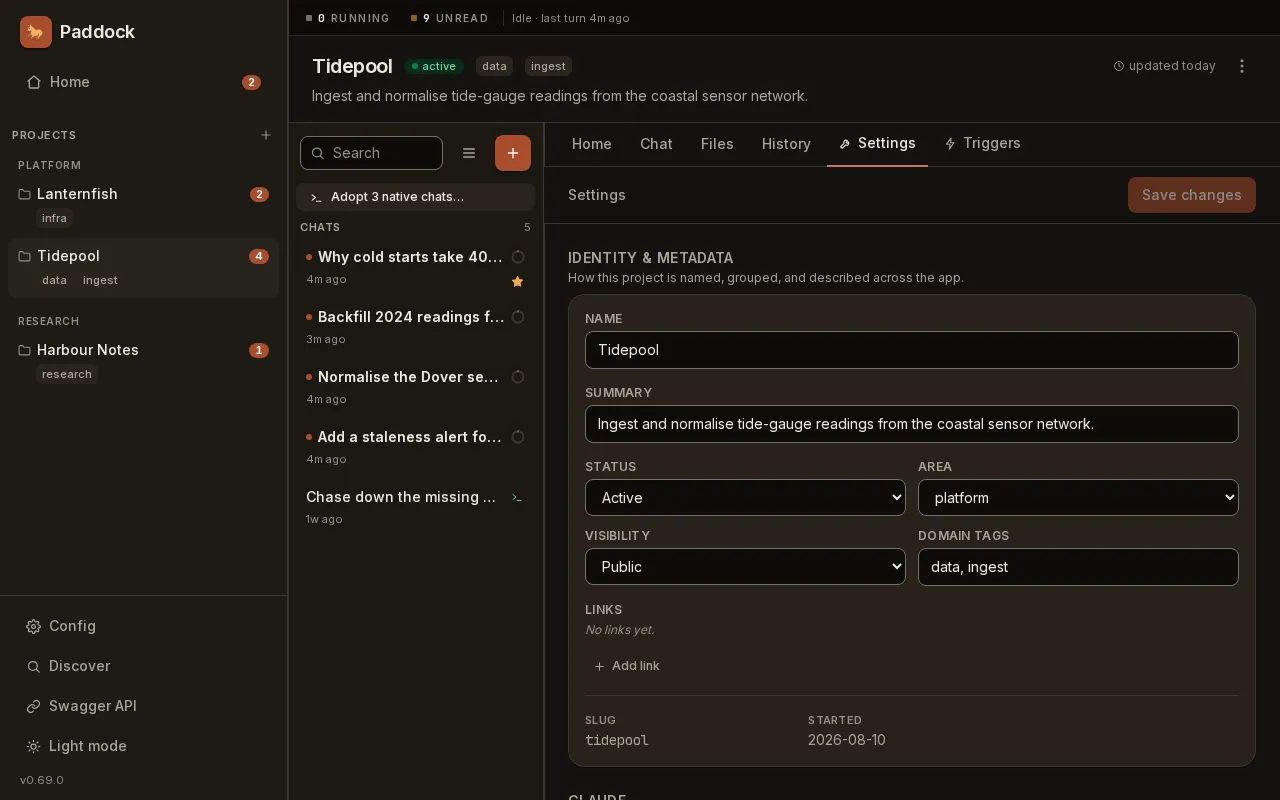
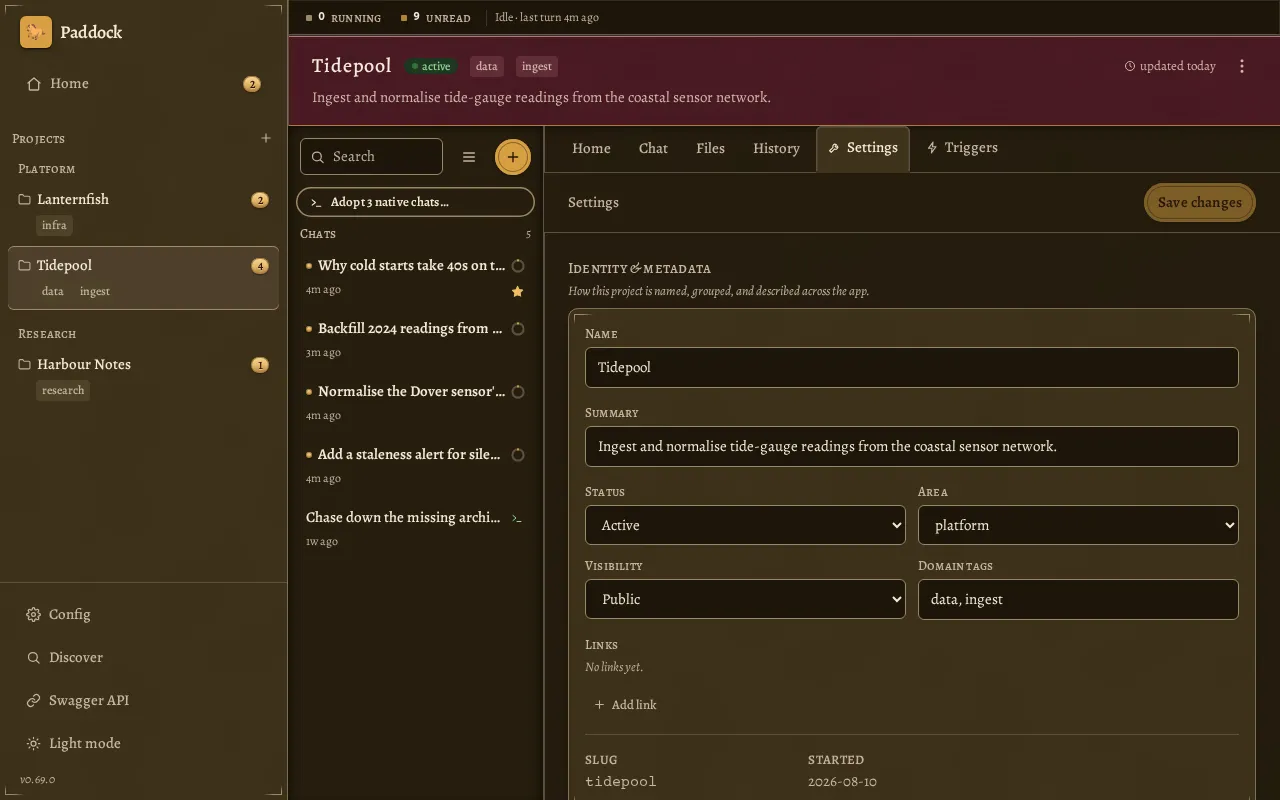
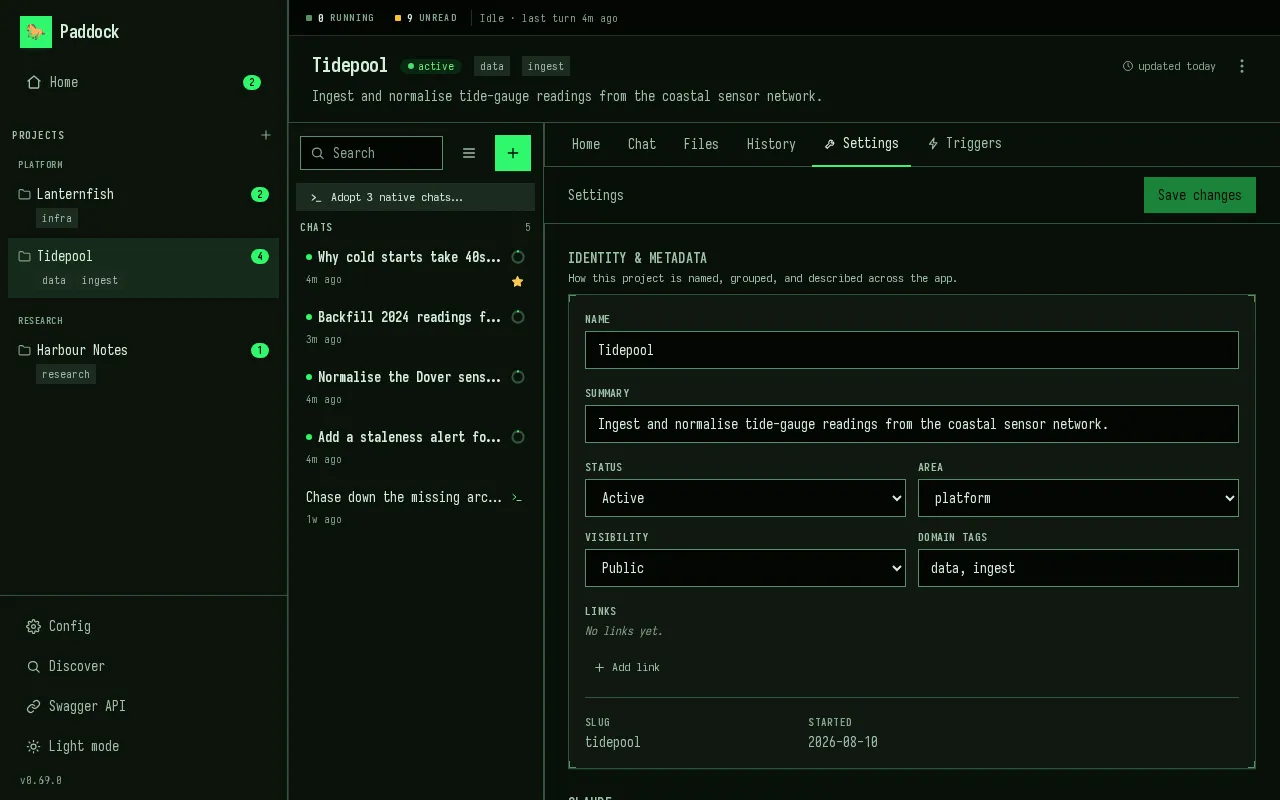
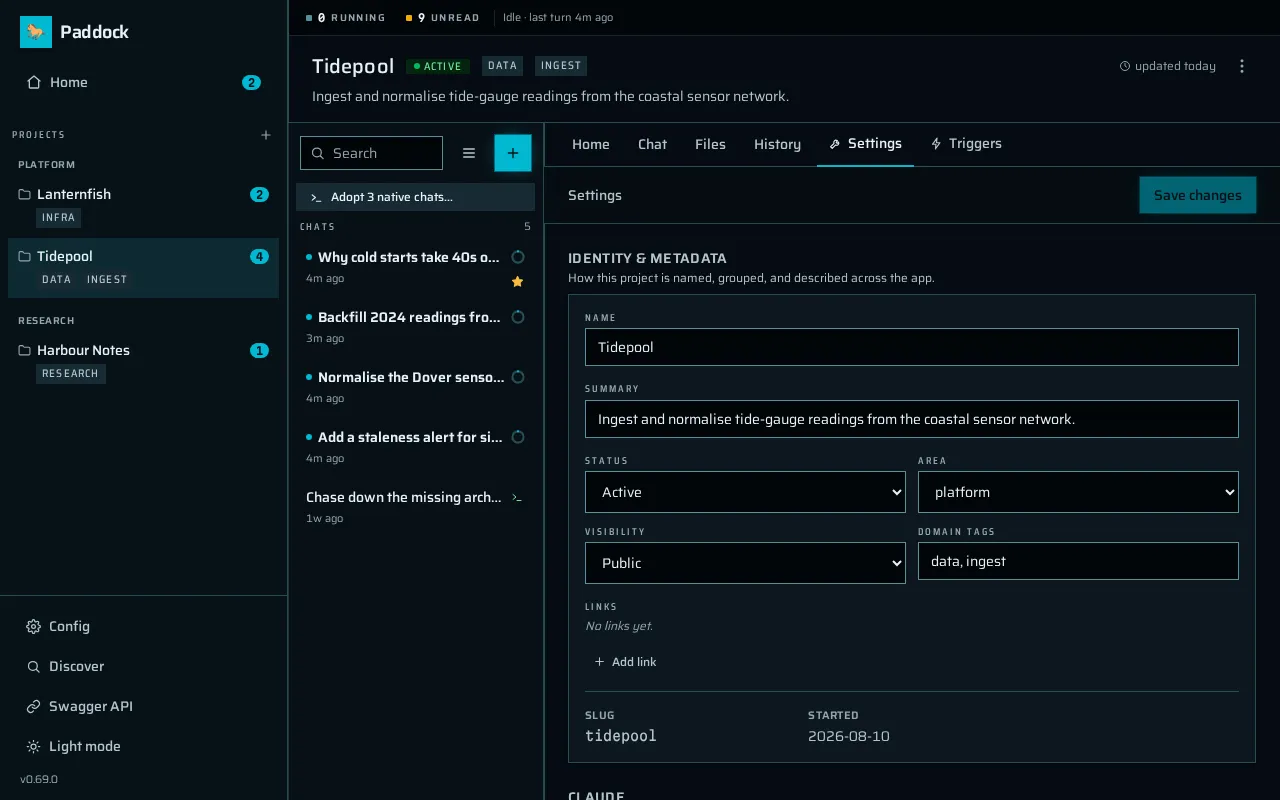
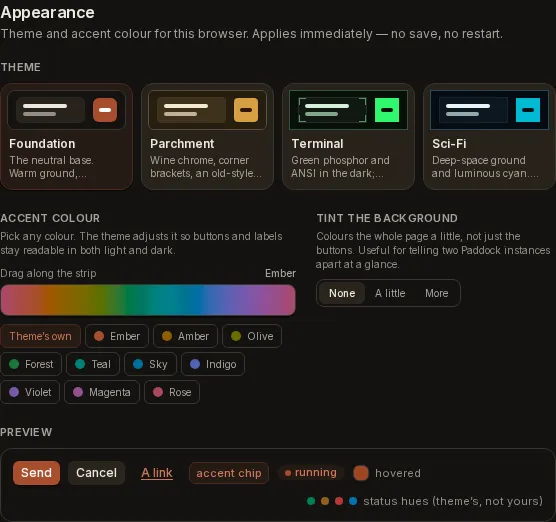
Four themes, in Config → Appearance, applied instantly. Foundation is the neutral base — warm ground, terracotta accent. Parchment is a 90s RPG menu: wine chrome, brass fittings, corner brackets, an old-style serif. Terminal is green phosphor and ANSI in the dark, greenbar and ribbon ink in the light. Sci-Fi is a deep-space ground and luminous cyan. Both light and dark are designed for each theme, not inverted from one another, and every theme is contrast-guarded in both modes by the same build-time check — which now also fails both ways, on a theme registered with no stylesheet and on a stylesheet no one registered.
It is a per-browser choice: no save, no restart, nothing an operator sets for everyone, and it survives a reload without a flash.
The same screen — a project’s Settings tab — in each of the four, all in dark mode:
-
Pick any colour for the accent and it stays readable. The picker takes a colour and nothing else. The theme supplies its own saturation and its own target contrast, and the lightness is solved to clear that floor — so the colour you pick is re-solved against whichever theme and mode you are in, rather than used at whatever lightness it happened to arrive with. Flip to dark and it is solved again. There is a spectrum strip, ten named hues, and a Theme’s own button to put it back.
Optionally the same colour tints the page ground — None, A little, More — which is the fast way to tell two Paddock instances apart at a glance. No colour theory is exposed anywhere in the UI.
PADDOCK_BRAND_ACCENTstill composes: with no colour picked, the solver reads the hue your brand colour produced and re-solves it against the active theme, so it is now a hue seed rather than a literal colour. A colour you pick yourself overrides it.
Also fixed here: in dark mode the primary button’s fill lightened on hover, taking its white label from 5.53:1 to 4.17:1 — below AA, on hover, on the most-clicked control in the app. Hover raises contrast in both modes now.
-
A live strip above every screen says what the herd is doing. How many turns are in flight fleet-wide, how many chats are holding a reply you have not read, and a channel per running turn carrying its project, a live elapsed clock and a segmented context gauge. Longest-running first, up to three channels depending on the width of your window and an honest
+Nfor the rest — the counts themselves stay exact. Clicking a channel opens that chat.Two of those did not exist anywhere in the UI before. A turn that had been going forty minutes and one that started eight seconds ago looked identical, and context pressure was visible only inside the chat it belonged to — by which point you had already opened it. An idle fleet costs nothing: no timers, no requests. While something is running it refreshes the chat names and context fills every thirty seconds, and the only thing that animates is the clocks, because a persistent readout is on screen 100% of the time and anything decorative in it is decorative forever.
(Since 0.69 the strip also counts chats that are only running background work, which have no turn to time — those channels show
—:—where the clock would be.) -
Home’s empty states are invitations, and the Config screen is readable. A quiet workspace used to render five near-identical rounded boxes down one viewport, four of them dead ends, with the first two saying the same thing twice. The two attention feeds now collapse into a single “All caught up” panel when both are empty — one state, not two — and it is the only thing on the screen carrying a primary action. It is deliberately not shown while the feed is loading or after it errored, because claiming all is caught up before the answer arrives is a lie the reader acts on. The remaining empty states say who fills them in and when:
OVERVIEW.mdandCHANGELOG.mdare written by the post-turn sweeper, not by hand.On Config, one measure replaces four unrelated left edges, fields became rows instead of a ragged two-column grid, everything routes through the same card and control primitives as the other settings screen, and the dirty marker no longer shoves an edited field out of its own track. The section rail used to vanish below 1024px, handing you back the 5,500px scroll its whole flat shape was justified by; it runs horizontally under the filter at those widths now. The twenty amber
envchips are quiet, because being set from the environment is a fact about a field rather than a warning about it. The restart banner stays loud. It earned it.
0.66.2 — Nothing you typed goes missing
Section titled “0.66.2 — Nothing you typed goes missing”- A file staged while a turn was running no longer rides the next message. Attachments were consumed by sending and never by queueing, so a file staged mid-turn sat in the tray and went out silently with whatever you sent next. Attachments now travel with the queued message, every window sees them, and Stop hands them back.
- Reloading mid-turn no longer eats the reply. A remount fetched the transcript and applied it wholesale, throwing away every frame that arrived while the fetch was in flight — losing the assistant’s entire reply and leaving a sub-agent card spinning on “running” until another reload.
- The sidebar unread badge can always be cleared. It counted deleted chats,
so it could read
3with one chat left and no way to reach zero. Deleting a chat now takes its bookkeeping with it, and an instance already stuck heals itself on the next load. - A new project with an old project’s name starts empty. Re-creating “Foo” used to inherit the deleted Foo’s run history and a phantom unread badge.
- Archiving a chat silences it everywhere. It used to count toward the sidebar badge while being excluded from Home’s Unread feed.
0.66.1 — Queued messages
Section titled “0.66.1 — Queued messages”- Three ways a queued message could be silently lost are fixed. The queue —
the chip holding what you type while a turn runs — deduped on a timestamp from
your browser, so one fast clock destroyed every later queued message on that
chat. It also drained from only one of the eight places a turn can end, so
anything queued behind a
/compact, a trigger or a background sub-agent sat stranded until a later message flushed it. - A second tab merges instead of overwriting. The queue is one shared slot per chat. Previously a second window replaced the first one’s message, and that client then watched someone else’s text appear as though they had typed it.
- Stop returns your queued message to the composer rather than sending it.
0.66.0 — Config screen, and a new default port
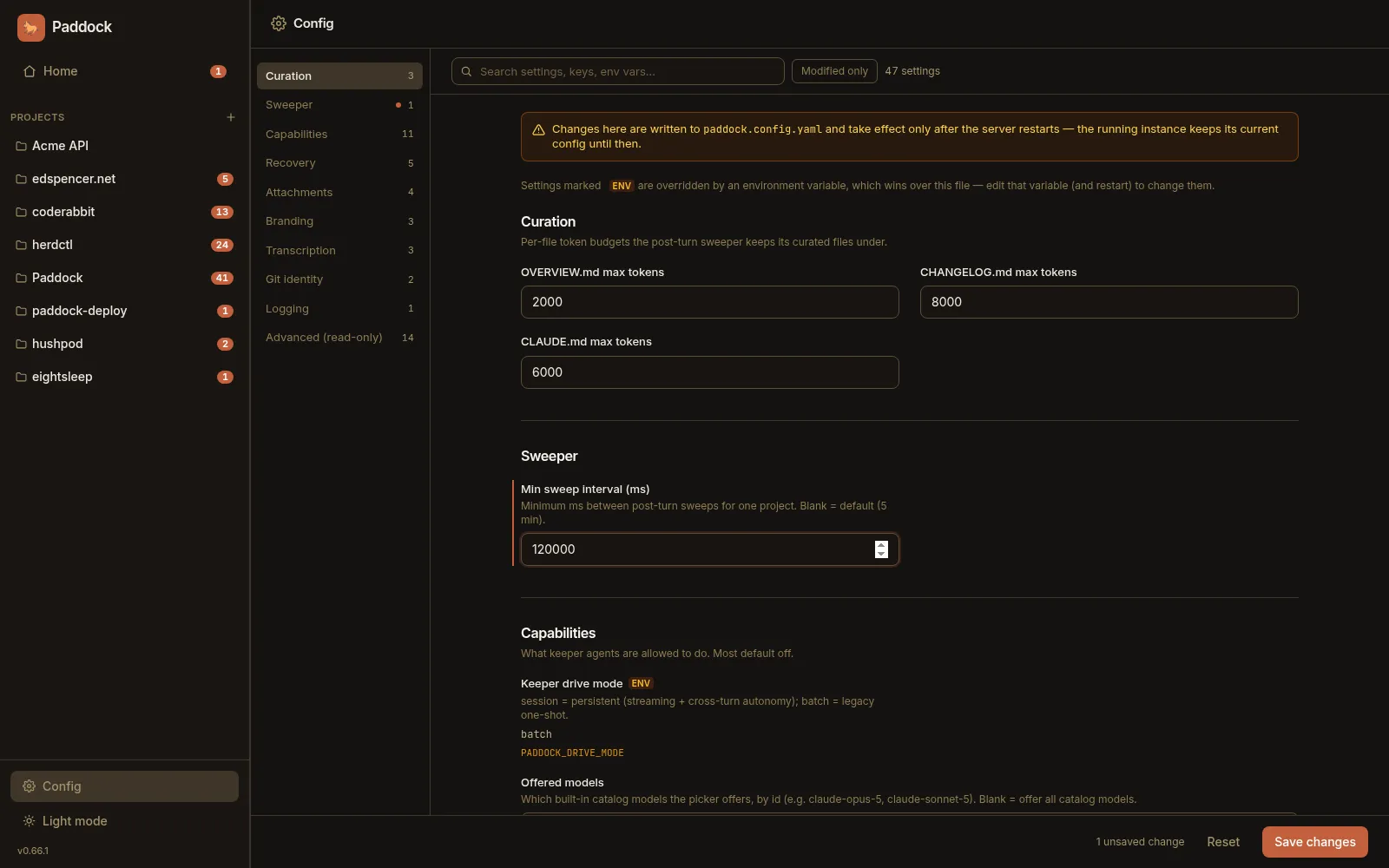
Section titled “0.66.0 — Config screen, and a new default port”- The instance Config screen is now navigable. Forty-seven settings that rendered as one 5,508-pixel column get a section rail with counts and scroll-spy, a live filter, and a Modified only lens. It follows VS Code’s settings screen rather than tabs, and that is the argument: tabs partition, which is exactly what defeats a search. The filter matches labels, keys, help text and environment variable names. Env-overridden settings carry a chip, explained once in a legend rather than beside twenty fields.
- Breaking: the default port moves from 4000 to 7233. Setting
PORT,port:or--portchanges nothing. If you rely on the default, update your reverse proxy,docker run -p, KubernetestargetPortand SSH tunnels — or pinPORT=4000. - Both on-disk formats declare a
schemaVersion. An older build used to drop keys it didn’t recognise and write the file back without them. A config file from the future now refuses to start; a project file is skipped loudly. Nothing on disk changes — the current shape is version 1. - Deleting or reverting a chat stops the turn first.
claudewrites the transcript itself, so unlinking it mid-turn didn’t delete the chat — the live process wrote itself back, stripped of history. Promote lost it from both projects. - The UI says “adopt” rather than “import” — where the transcripts are your
own
~/.claude, the sessions offered are already there and the action only registers them. Your originals are never moved or deleted. - A running sub-agent keeps its place in the bar. Backgrounded sub-agents pair within milliseconds, so one was stamped with a final duration that kept climbing.
- On
driveMode: batchonly, deleting the chat you just finished no longer misfiles your next message into a new session.
0.65 — promote_project over MCP
Section titled “0.65 — promote_project over MCP”- An agent can convert its own notebook project to a repo-backed one. Without
an MCP verb it had to stop and ask, or create a second project and abandon the
first — losing every chat in it.
promote_projectclones, re-points the working directory and re-registers against the existing chat store. A failed clone rolls back.
0.64 — Linked directories, managed and unmanaged
Section titled “0.64 — Linked directories, managed and unmanaged”path:links a directory that already exists, used in place. No copy, no clone: your checkout keeps its history, branches and remotes. Paddock writes nothing into it, and deleting the project never touches it.- Two axes replace one flag. Managed means Paddock curates the project’s own
files; unmanaged means you version-control the content yourself. Whether a git
repo sits behind it is a separate question.
repoBackedis removed from the API response. - The Changes tab reports on the code, not the notes — it had been reading the metadata directory.
0.63 — Host plugins and MCP server fidelity
Section titled “0.63 — Host plugins and MCP server fidelity”- A plugin installed in Claude Code now works here. Sharing instructions brings its commands, agents and skills; sharing MCP servers brings its servers too, each allow-listed automatically — without that they connect and have every call denied with no prompt.
headersandtypeon an inherited MCP server are carried through rather than stripped, which matters because a stored OAuth token is keyed on a hash including both.- On
driveMode: batch, a credential declared inmcpServers:is readable in process arguments by any local user while a turn runs. Paddock can’t fix this from its side, so it warns at startup. The defaultsessionmode is unaffected.
0.62 — Granular host Claude inheritance options
Section titled “0.62 — Granular host Claude inheritance options”Paddock sits next to Claude Code state you already have: transcripts, a login, an
MCP server or two, a curated CLAUDE.md. Until this release it reached all of
that through one lever — which Claude home it pointed at — so moving it for
one reason changed four others. That is how a single week produced data
loss, an invisible macOS
login, and a delete that
destroyed real terminal history.
-
Five independent keys, each answering whose X does this instance use?
claude:transcripts: own # own | host — default owncredentials: host # own | host — default hostinstructions: own # own | host — default ownhooks: own # own | host — default ownmcpServers: own # own | host — default ownownis Paddock’s, isolated inside the data dir;hostis this machine’s Claude Code. Omit the block for full isolation apart from your login. What Paddock touches on your machine states the guarantee in one place. -
⚠️ If you keep a curated
~/.claude/CLAUDE.md, read this one.instructionsdefaults toown, so your user-levelCLAUDE.md,agents/,commands/andplugins/are not loaded; every release before 0.62 bridged them in unconditionally. Setinstructions: hostto keep the old behaviour. Each project’s ownCLAUDE.mdis loaded in every mode and is unaffected. The change bites on the CLI paths — the sweeper, triggers anddriveMode: batch— where those files did still apply. (0.64 raised the startup notice to a warning, so you are now told.) -
Host
settings.jsonhooks no longer run inside Paddock turns. Every hook you had ever configured used to run here with no way to turn it off.hooks: hostrestores them; the rest of that file still applies either way. -
Your own MCP servers can reach Paddock two ways.
claude.mcpServers: hostattaches what is already in your~/.claude.json. A siblingmcpServers:block declares servers to Paddock itself — the answer for a container with nothing to borrow — whereenv:VAR_NAMEreferences keep tokens out of a git-tracked file. -
Deleting a shared chat releases it instead of destroying it. Under
transcripts: hosta Paddock chat and aclaude --resumein the same directory are the same file, so delete no longer meansrm— the transcript is your history, not Paddock’s copy. -
CLAUDE_HOMEand--isolated-claude-homeare removed, replaced by the block above.CLAUDE_CONFIG_DIRstill works as “put Paddock’s home here”, but a value resolving to your~/.claudeis now a startup refusal rather than a silent re-coupling. No migration needed.
0.61.1 — CLI login, and symlinks into your Claude home
Section titled “0.61.1 — CLI login, and symlinks into your Claude home”-
Paddock no longer plants anything in a Claude home it doesn’t own. It used to redirect a directory’s transcripts by replacing
~/.claude/projects/<encoded-dir>with a symlink to the workspace’s.chats/. It skipped directories you already had history in, but not empty ones — which was exactly what--here(removed in 0.68) was usually pointed at. From then on everyclaudesession in that directory was written into Paddock’s store, so deleting.chats/took real history with it. One person lost 30 transcripts this way. -
On a Mac, your existing Claude Code login works again. Claude Code files its Keychain entry under a name derived from whether
CLAUDE_CONFIG_DIRis set, so once Paddock pointed at its own Claude home a perfectly good login went invisible and every turn failed withNot logged in. A Keychain entry can’t be bridged the way a.credentials.jsoncan, so with no token in your environment the CLI now runs against your own~/.claude. (0.62 removed--isolated-claude-home;claude.credentialsandclaude.transcriptsdecide this now.) -
A first run with no credentials prints a message, not a crash. It used to emit several screens of stack trace containing the whole sweeper system prompt, four times, with the useful line forty lines down.
0.61.0 — Paddock’s own Claude home
Section titled “0.61.0 — Paddock’s own Claude home”-
Transcripts move out of
~/.claudeinto Paddock’s data directory. They were the last state living outside it, reached by planting symlinks into your Claude home — and the code doing that would, on every agent registration, copy your transcripts out and delete the originals, inside a barecatch. Paddock now keeps its own home under the data dir and only ever reads~/.claude. -
Four turn-level fixes. Appending to a queued message no longer discards the addition; Stop works on a
/compact, where slash-command turns had never registered a cancellable id; marking the chat you are reading as unread survives its own turn landing; and the sidebar stops flashing to skeletons twice per turn. -
Paddock is MIT licensed, and the packaging now says so. There was no licence file and no
licensefield, while the publish script defaulted it to MIT — so every release told npm one thing while the source granted another.
0.59.1–0.60 — npx install, --here, and confirmed adoption
Section titled “0.59.1–0.60 — npx install, --here, and confirmed adoption”-
npx @edspencer/paddockstarts an instance in one command — server, web UI and Claude Code runtime, no Docker and no clone. It starts quiet, says where it put your data, and warns up front rather than failing on the first turn. -
--hereopens the directory you are standing in as the workspace, rather than creating a project somewhere else. It creates.paddock/for state and.chats/for transcripts and adds both to your.gitignore; later runs resume with no flag. The model isgit init, with.paddock/as.git. -
Adoption asks before it takes anything. The old button imported everything on one click and could not be undone. It now opens a dialog listing candidate sessions grouped by source directory — the source path being the detail that makes “these are from a scratch copy, not my checkout” visible before you commit — and a successful adoption offers Undo.
-
It stops offering chats that were never yours. Paddock’s own curation runs were being offered as terminal history, and a same-named directory anywhere on disk counted as your checkout; a repo-backed project now requires the git remotes to match.
-
Published with provenance — releases go to npm from CI through OIDC trusted publishing, with a signed attestation tying each version to the commit.
Earlier releases
Section titled “Earlier releases”Everything from 0.58 back to 0.29 lives on What’s New — earlier releases: adopting Claude Code CLI chats, the npm package, the environment system prompt, Home’s attention feeds, subtree actions and the one-front-door sidebar, the root becoming a workspace, scratch being retired, driving Paddock from outside over MCP, per-message fork and revert, attachments, streaming, unified triggers, and the rest.
Maintaining this page: add a short, user-facing entry here whenever you cut a release (see RELEASING.md). When this page gets unwieldy, move the oldest entries to the archive page verbatim — the archive is append-only and its entries are never rewritten.