
Schedules reference
The declarative reference for schedules: the trigger schema, the older standalone
schedules block, the self-MCP tools Claude uses to manage a project’s schedules,
and the REST surface behind the Triggers tab.
The trigger schema (schedule)
Section titled “The trigger schema (schedule)”A schedule is a trigger persisted in a project’s project.yaml under the
triggers map, keyed by name. Each trigger is trigger (when) +
run (what) + enabled:
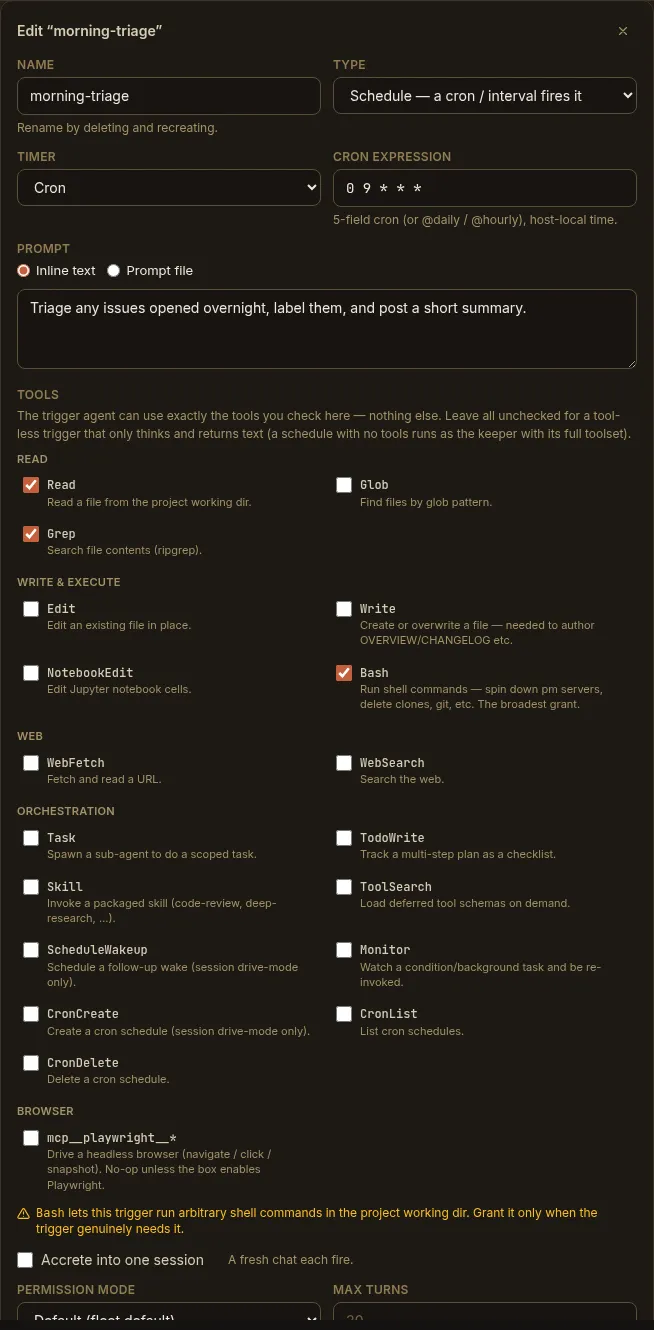
triggers: morning-triage: trigger: # WHEN — the schedule type: schedule cron: "0 9 * * *" # 5-field cron (or @daily / @hourly), host-local # interval: "30m" # …or a duration; exactly ONE of cron / interval run: # WHAT — the fired agent turn prompt: Triage overnight issues and post a summary. # promptFile: triage.md # …or a .md file under .paddock/triggers/; exactly ONE session: new # "new" (default) | "resume" tools: [Read, Grep] # allow-list = capability; [] = the project's own agent model: "" # optional model override permissionMode: acceptEdits # default | acceptEdits | bypassPermissions | plan maxTurns: 30 # optional cap (default 30) maxSpawnDepth: 0 # optional; 0 = may not spawn children enabled: trueThe fields:
| Field | Values | Notes |
|---|---|---|
trigger.type | schedule | The discriminant. Triggers can also be event (an onArchive / afterTurn lifecycle event) or webhook — the latter is shape-reserved but not yet fireable (no inbound ingress yet). The afterTurn event is reserved for the built-in sweeper/curator. |
trigger.cron | 5-field string | e.g. 0 9 * * *; @daily / @hourly accepted. Host-local time. |
trigger.interval | duration string | e.g. 30m, 1h, 15m. |
run.prompt | string | The instruction the firing runs. |
run.promptFile | *.md name | Read fresh at firing from .paddock/triggers/; traversal and non-.md are rejected. |
run.session | new | resume | new (default) = a fresh chat each firing; resume = one owned accreting session. |
run.tools | string array | The fired agent’s allow-list. Empty (default) = runs as the project’s own agent with full tools; non-empty = its own scoped trigger-<slug>-<name> agent with exactly those tools. |
run.model | string | Optional per-trigger model override. |
run.permissionMode | default | acceptEdits | bypassPermissions | plan | Permission mode the fired turns run under. bypassPermissions runs every tool unprompted — see the caution below. |
run.maxTurns | integer | Upper bound on agent turns (default 30). |
run.maxSpawnDepth | integer ≥ 0 | Bounds internal spawning (0 = may not spawn). |
enabled | boolean | Whether it’s armed. A trigger created through the UI or MCP defaults to disabled. |
The schedule editor maps one-to-one onto this schema:
The legacy schedules block
Section titled “The legacy schedules block”Before triggers were unified, schedules lived in their own top-level schedules
map. That form is still honored and armed — a simpler shape when you only need
a timer:
# project.yaml — legacy standalone schedules (still supported)schedules: nightly-scan: type: cron # cron | interval cron: "0 3 * * *" prompt: Scan for dependency advisories. resume_session: false # note: snake_case here (false = fresh chat each fire) enabled: trueNote the differences from the unified run block: resume_session (snake_case)
in place of session: new|resume, and promptFile here resolves under
.paddock/schedules/ rather than .paddock/triggers/. New work is better
expressed as a triggers entry (it’s what the Triggers tab and the MCP tools
read and write), but existing schedules blocks keep working.
Self-MCP tools
Section titled “Self-MCP tools”When the trigger-management MCP is enabled
— the self-MCP write layer (PADDOCK_SELF_MCP + PADDOCK_SELF_MCP_WRITE) plus
PADDOCK_HOOKS_MCP (or a per-project hooksMcpEnabled) — Claude is given four
tools. They manage every trigger type; for a schedule, use type: "schedule".
set_trigger
Section titled “set_trigger”Create or update a trigger (a partial patch — an enabled-only call just flips the
toggle). Parameters (note the snake_case MCP argument names):
| Parameter | Type | Notes |
|---|---|---|
name | string | The trigger’s stable key. Required. |
type | schedule | event | webhook | Omit on an edit to keep the existing when. webhook is reserved (not yet fireable); afterTurn events are reserved for the curator. |
cron | string | For a schedule: a 5-field expression (host-local). Exactly one of cron / interval. |
interval | string | For a schedule: a duration (30m, 1h). |
prompt | string | Inline instruction. Provide this or prompt_file. |
prompt_file | string | A .md file under .paddock/triggers/, read at firing. |
session | new | resume | new (default) = fresh chat each firing; resume = one owned session. |
tools | string / array | Allow-list (one per line, comma-separated, or a JSON array). Empty = the project’s own agent. |
model | string | Model override for the fired agent. |
permission_mode | default | acceptEdits | bypassPermissions | plan | |
max_spawn_depth | number | 0 = may not spawn. |
max_turns | number | Caps the fired turn. |
enabled | boolean | Defaults false on a new trigger; omitted on an existing one leaves it unchanged. |
project | string | Target project slug; omit for the current project. |
list_triggers
Section titled “list_triggers”List a project’s triggers (all types) — what’s declared, and their state.
remove_trigger
Section titled “remove_trigger”Delete a trigger by name.
run_trigger
Section titled “run_trigger”Fire a trigger immediately, without waiting for its cron or event — the same “Run now” path the Triggers tab uses. Handy for testing a prompt before you leave it to a schedule. Like the REST route, it starts a real turn, so it is gated with the rest of this family.
REST endpoints
Section titled “REST endpoints”The Triggers tab drives the unified trigger surface. These endpoints are always available (they don’t require the schedule-mutation gate):
| Method & path | Purpose |
|---|---|
GET /api/projects/:slug/triggers | List triggers + the picker catalog (grantableTools, events, triggerTypes). |
GET /api/projects/:slug/triggers/:name | Get one trigger. |
PUT /api/projects/:slug/triggers/:name | Create or replace one trigger (full { trigger, run, enabled } record). Enable/disable is this call with enabled flipped. |
DELETE /api/projects/:slug/triggers/:name | Delete and disarm one trigger. |
GET /api/projects/:slug/triggers/runtime | Just the armed / next-fire runtime state, so the Triggers tab can poll cheaply without re-fetching the config and picker catalog. A static segment, matched before /:name. |
POST /api/projects/:slug/triggers/:name/run | Run now — fires through the same hub path a cron or event fire uses. 202 with the session id; 404 for an unknown trigger, 502 if the fire started no chat. |
Next steps
Section titled “Next steps”- Schedules — the concept.
- Scheduling recurring work — the hands-on guide.
- Scheduling configuration — the deployment gates.